Stream SAP data into Confluent.
The ASAPIO Integration Add-on is certified as Source and Sink for Confluent Platform and Confluent Cloud – real-time, bidirectional, no separate server required.
 SAP Silver Partner
 Confluent Certified
Confluent-certified for Confluent Platform & Cloud
Confluent-certified as Source and Sink for Confluent Platform and Confluent Cloud. Means you get a tested, supported integration path – not a custom connector that needs ongoing maintenance.
Bidirectional
Both outbound (SAP → Confluent) and inbound (Confluent → SAP) are supported. For outbound, choose between real-time single-event mode or batch mode. For inbound, ASAPIO delivers Confluent messages into SAP via IDoc, BAPI or custom code.
No-code payload design
Model SAP data into Confluent messages using the ASAPIO Payload Designer – no ABAP development for standard SAP objects. The same configuration approach works across all ASAPIO connectors, so teams already familiar with one connector ramp up quickly.
Three connectivity paths
Connect via the native Kafka protocol or the Confluent Cloud V3 REST API for outbound scenarios without a separate REST proxy infrastructure, or via Confluent REST Proxy when full bidirectional support is required.
Any SAP ABAP system
Supports the full range of SAP NetWeaver ABAP systems: SAP ECC 6.0 EhP 6 or higher, SAP S/4HANA On-Premise, SAP S/4HANA PCE, SAP BW, SAP HCM, and many other SAP applications running on NetWeaver. See Minimum Requirements for details.
Fast deployment
Five steps from installation to first message in Confluent: import transports via STMS, configure endpoint and auth, design payload, link a SAP event trigger, and activate. Documented step-by-step.
Confluent-certified integration for Confluent environments
ASAPIO is Confluent-certified as a Source and Sink connector for both self-hosted Confluent Platform and fully-managed Confluent Cloud deployments.

Central Control with Event Studio
Manage all your Kafka interfaces from a single browser-based cockpit. The ASAPIO Event Studio provides a high-level overview of message throughput, individual event logs, and connection health – perfect for both developers and operations teams.
- Monitor real-time message flow vs errors
- Deep-dive into individual message payloads
- One-click debugging and replay capabilities
How the connector fits into your landscape
The ASAPIO Integration Add-on runs inside your SAP system and connects via REST Proxy, direct Confluent Cloud V3 API, or the native Kafka protocol – no middleware server required on the SAP side.
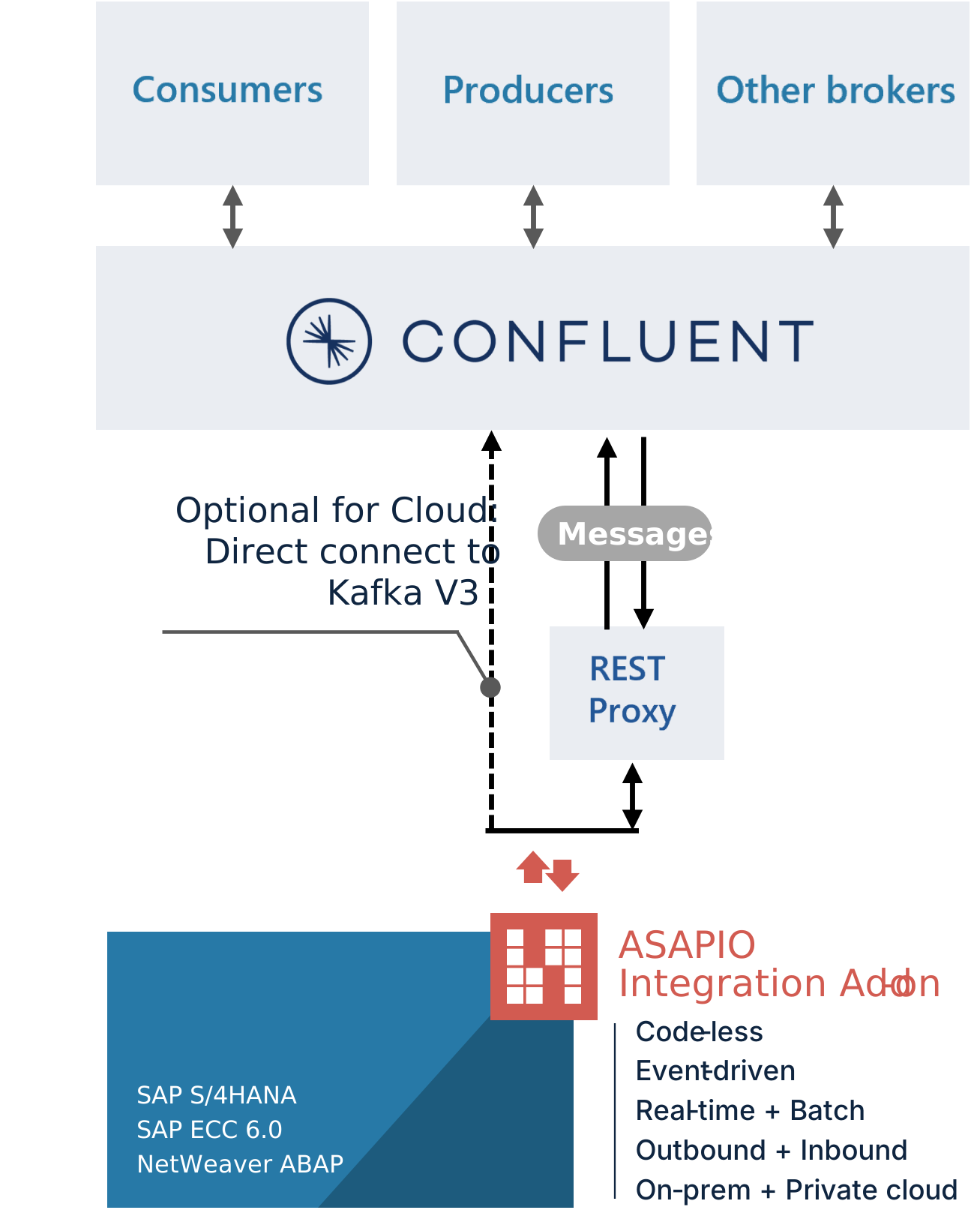
Three connectivity paths
-
REST Proxy (bidirectional)
Full inbound and outbound support via Confluent REST Proxy. Required for Confluent → SAP message flow. Works with both Confluent Platform and Confluent Cloud.
-
Confluent Cloud V3 API (outbound)
Direct connection to Confluent Cloud without a REST Proxy. Ideal for outbound-only scenarios and cloud-native deployments where you want to avoid additional infrastructure.
-
Kafka protocol (outbound)
Talks to Kafka brokers directly over the native protocol – no REST Proxy in the loop. Uses bootstrap-server discovery for multi-partition topics, the connectivity model Confluent Cloud and most multi-broker Kafka clusters require.

Five steps to SAP-Confluent streaming
From transports through first message – deployment is straightforward and fully documented. No custom code, no infrastructure complexity.
Deploy the ASAPIO Integration Add-on into SAP using the standard Transport Management System. No unusual procedures – just like any other SAP component import.
Provide the connection details: Kafka bootstrap servers for native-protocol outbound, REST Proxy endpoint for bidirectional setups, or Confluent Cloud V3 API URL for cloud-native deployments. Validate the connection with a test in the ASAPIO configuration UI.
Configure authentication credentials for Confluent access in ASAPIO. Credentials are stored securely in the SAP Secure Store. Refer to the documentation for supported authentication mechanisms.
Use the Payload Designer to define which SAP data fields go into which Confluent message fields. No ABAP needed – visual configuration maps tables, CDS views or IDocs directly to Kafka topics.
Enable the interface with a toggle. Watch messages flow in real-time from the Event Studio dashboard. Monitor delivery status, message counts, and error details. Replay messages if needed for testing or troubleshooting.
Confluent Platform or Confluent Cloud?
ASAPIO supports both deployment models, from small-scale event streaming to high-throughput data streaming at scale. Choose based on your infrastructure strategy – the connector configuration is the same for both.
Confluent Platform
The self-managed, on-premise distribution of Apache Kafka with enterprise-grade additions: Schema Registry, ksqlDB, Kafka Connect, Control Center and more. Best suited for organisations with existing Kafka infrastructure or strict data residency requirements.
- Full control over data and infrastructure
- On-premise, private cloud or hybrid deployments
- Enterprise security and compliance tooling
- Native Kafka protocol for outbound, or Confluent REST Proxy for bidirectional SAP integration
Confluent Cloud
Fully managed, serverless Kafka as a service running on AWS, Azure or Google Cloud. No infrastructure to operate – Confluent handles availability, scaling, security patching and upgrades. Reduces time-to-value significantly for teams without dedicated Kafka expertise.
- No infrastructure to deploy or maintain
- Available on AWS, Azure and GCP
- Elastic scaling without capacity planning
- Direct V3 API or native Kafka protocol connection – no REST Proxy needed for SAP outbound
Common questions
Can't find the answer here? Contact our team directly.