SAP Approval in Microsoft Teams
Integrate and manage SAP approvals directly within Microsoft Teams, using Azure services and ASAPIO Integration Add-on.
Not every approver works daily in SAP.
Many approvers primarily use Microsoft Outlook or Microsoft Teams for their day-to-day work. Accessing SAP often requires a VPN connection – cumbersome to maintain, especially when travelling or working in a mobile scenario. The result: approval workflows stall, documents sit pending, and the team that built the SAP process spends time chasing decisions via email.
With the ASAPIO Integration Add-on and the Connector for Microsoft Azure, approval of business documents from S/4HANA can be executed directly within Microsoft Teams – no VPN, no SAP GUI login, no context switching.
Watch the workflow – from SAP trigger to Teams decision.
A recorded walkthrough of the complete approval flow: S/4HANA triggers the workflow, the adaptive card lands in Teams, the approver acts with one click, and SAP records the decision in real time.
Five reasons approvers prefer Teams.
Approval workflows belong where decisions are made – alongside the conversations, calendars, and context that already inform them.
Centralise approvals alongside daily communication in one platform. Approvers stay in Teams – no application switching, no login fatigue, no lost context.
Timely Teams alerts deliver the SAP approval task directly. The relevant document data is on the card – no need to open SAP to understand what requires a decision.
Approve, reject or comment directly on the adaptive card. The decision posts back to S/4HANA in real time – no SAP session required, no VPN, no GUI navigation.
Available on Teams desktop, mobile, and web. Approvals happen wherever the approver is – travelling, remote, or on the road – without VPN constraints.
Complete visibility of all pending approvals and their current status. Nothing falls through the cracks – the Teams interface surfaces what needs attention and when.
How the integration is built.
ASAPIO Integration Add-on connects S/4HANA directly to Microsoft Teams via Azure Service Bus and Power Automate – real-time, push-based, without custom middleware.
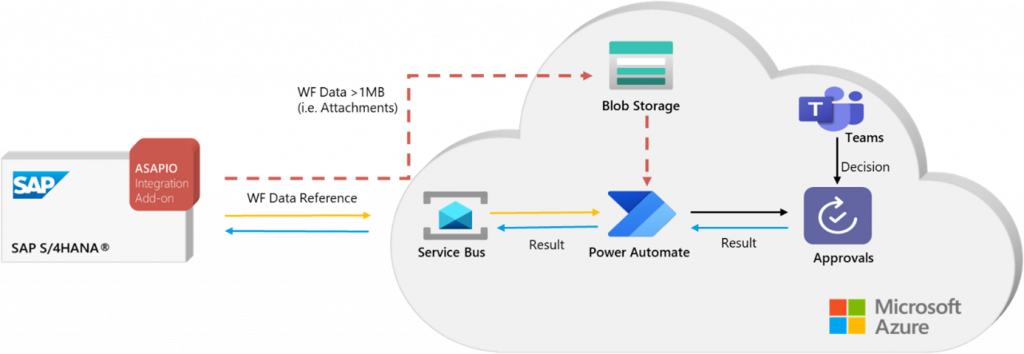
Built on 20+ years of SAP integration expertise.
The ASAPIO Integration Add-on connects S/4HANA approval workflows to Microsoft Teams – standardised, real-time, and without changes to your existing SAP processes.
- Standardised, real-time push integration – used by 250+ customers globally
- Direct connection to Azure – no additional gateways or complex middleware configuration
- Codeless configuration for defining the data and layout of each approval card
- Supports PR/PO approvals and flexible workflow-linked document types
- DMS attachments from S/4HANA viewable directly in Teams
- No changes to existing SAP processes, workflow configuration, or ABAP