ASAPIO Event Studio
A no-code web interface for deploying, managing and monitoring all your event-driven SAP integrations – from one central place, without touching ABAP.
All your SAP integrations.
One interface.
ASAPIO Event Studio is a web application that sits on top of the ASAPIO Integration Add-on. It connects to multiple SAP backend systems simultaneously via SAP BTP destinations and lets integration consultants and admins run the full lifecycle of event-driven interfaces – without writing a single line of ABAP.
- Designed for functional consultants and integration admins, not ABAP developers
- Deploy on SAP BTP (Cloud Foundry) or directly on your ABAP server
- Included with the Integration Add-on – no separate licence required
- Configurations stay in sync with classic SAP transactions – no data divergence
AI Assistant – built into Event Studio
The Event Studio AI Assistant guides you through the full configuration workflow. It understands your connector type, explains each setting in plain language, and suggests the right values for your SAP landscape – so you spend less time reading documentation and more time shipping integrations. It now runs on SAP AI Core or a bring-your-own LLM, so the underlying model fits your landscape and governance requirements.
- Context-aware guidance for every connector – Azure, Solace, SAP AEM and more
- Explains field-level settings without leaving the configuration screen
- Reduces onboarding time for new team members and project consultants
- Available in all Event Studio deployments – no separate setup required
Event Studio MCP Server – configure integrations from your AI client
The Event Studio MCP Server exposes the core functions of Event Studio as tools for MCP-compatible AI clients such as Claude. Describe in plain language what you need – your AI client creates events and interfaces, deploys them or reads monitoring data on your behalf, directly in your own SAP BTP subaccount.
- Create, deploy and publish events and interfaces to the Event Portal – step by step or in a single call
- Generate CDS views and register them in the Data Catalog
- Query monitoring data, traces and the AsyncAPI specification
- Controlled access through separate read-only and read/write role collections, with sign-in via your IAS tenant
Illustrative example of an MCP Server conversation – not a real product screenshot.
Everything you need to manage SAP integrations at scale
Six capabilities that cover the full integration management lifecycle – from first deployment to day-to-day operations and transport.
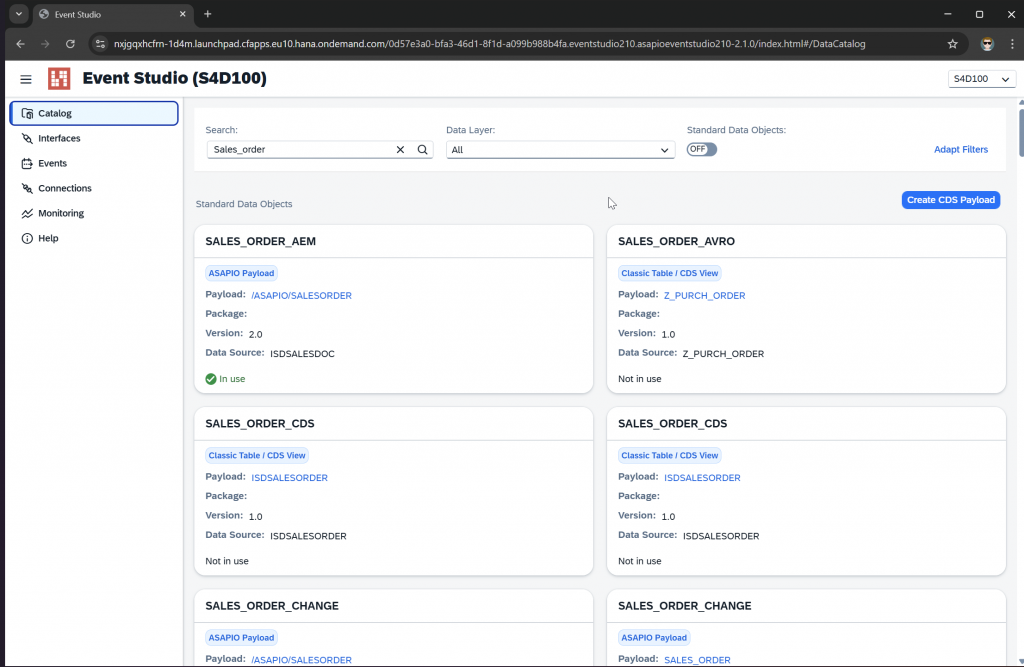
Data Catalog
Browse all available standard and custom SAP data objects in one searchable view. Inspect metadata, payload structure and deployment status – then deploy directly from the tile.
No-Code Interface Creation
Create and manage outbound interfaces through a guided step-by-step UI. Define connections, payloads, headers and load types – no ABAP development or back-end customising required.
Monitoring & Traceability
Filter activity by time range, inspect individual calls with status codes and timing, and download request/response trace files for root-cause analysis – without leaving the browser.
RAP & CDS Support
Leverage SAP S/4HANA RAP event messaging directly in Event Studio. Use CDS View Entities as message payloads alongside standard ASAPIO designs, classic tables and IDocs. Create CDS payloads and other Event Studio objects in your own custom namespace instead of ASAPIO's reserved one.
AsyncAPI Export
Export interface definitions as AsyncAPI schemas for SAP Build, SAP Developer Hub, Solace Event Portal and other event-driven tooling – keeping integration documentation always current.
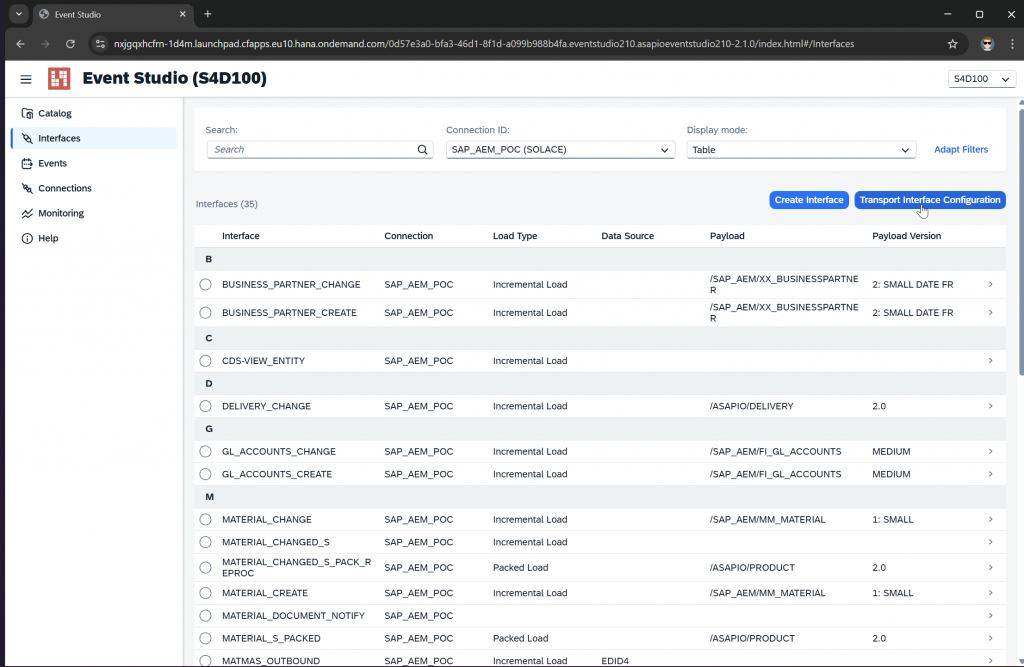
Configuration Transport
Move interface configurations across SAP systems using standard Workbench and Customizing transports. No manual re-configuration in target systems after promotion.
The operational case for Event Studio
Five reasons integration teams choose Event Studio over managing SAP integrations through classic transactions alone.
Centralized Control
Manage all integration configurations from one place – across multiple SAP systems and connectors, without switching tools.
No-Code Simplicity
Create or update interfaces without writing a single line of code. Functional consultants can run the full lifecycle independently.
Speed & Agility
Faster deployment cycles and streamlined configuration transport cut the time between design and production significantly.
Event-driven Readiness
Leverage modern event-driven practices with built-in RAP event trigger support and CDS View Entities as message payloads.
Improved Transparency
Real-time monitoring and full request/response traceability give operations teams the visibility they need without external tools.
From discovery to deployment in one click
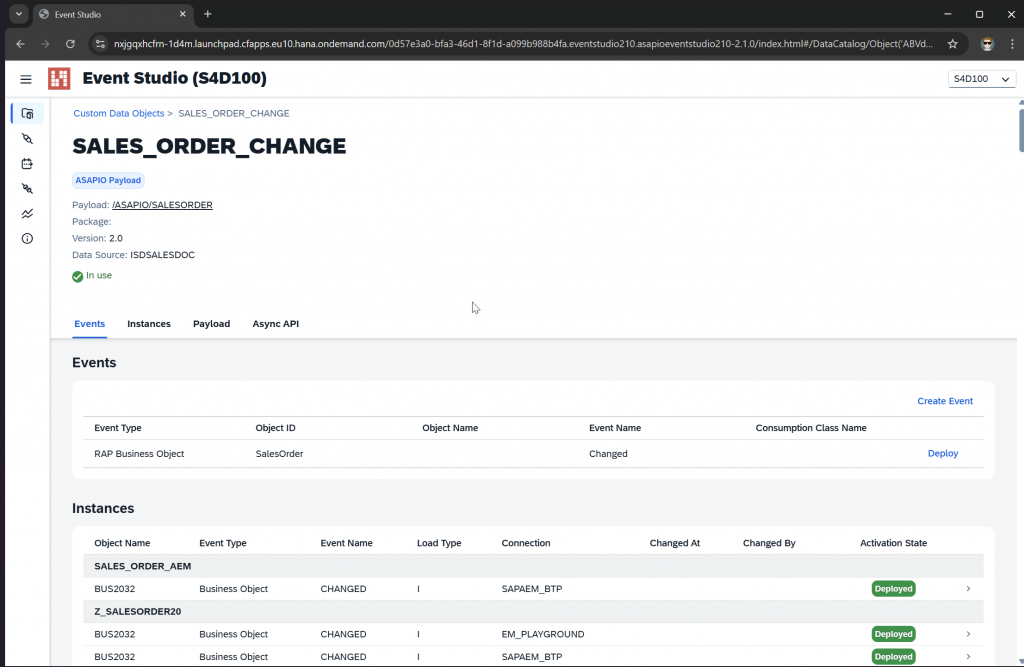
The Data Catalog surfaces every standard and custom SAP data object in a single searchable view. Each tile shows package, object name, event ID and domain – and lets you jump straight to deployment or download the AsyncAPI schema without leaving the browser.
- Browse predefined and custom events side by side
- Inspect payload structure, metadata and deployment status per object
- Launch deployment to any supported connector directly from the tile
- Download AsyncAPI schema for any data object in one click
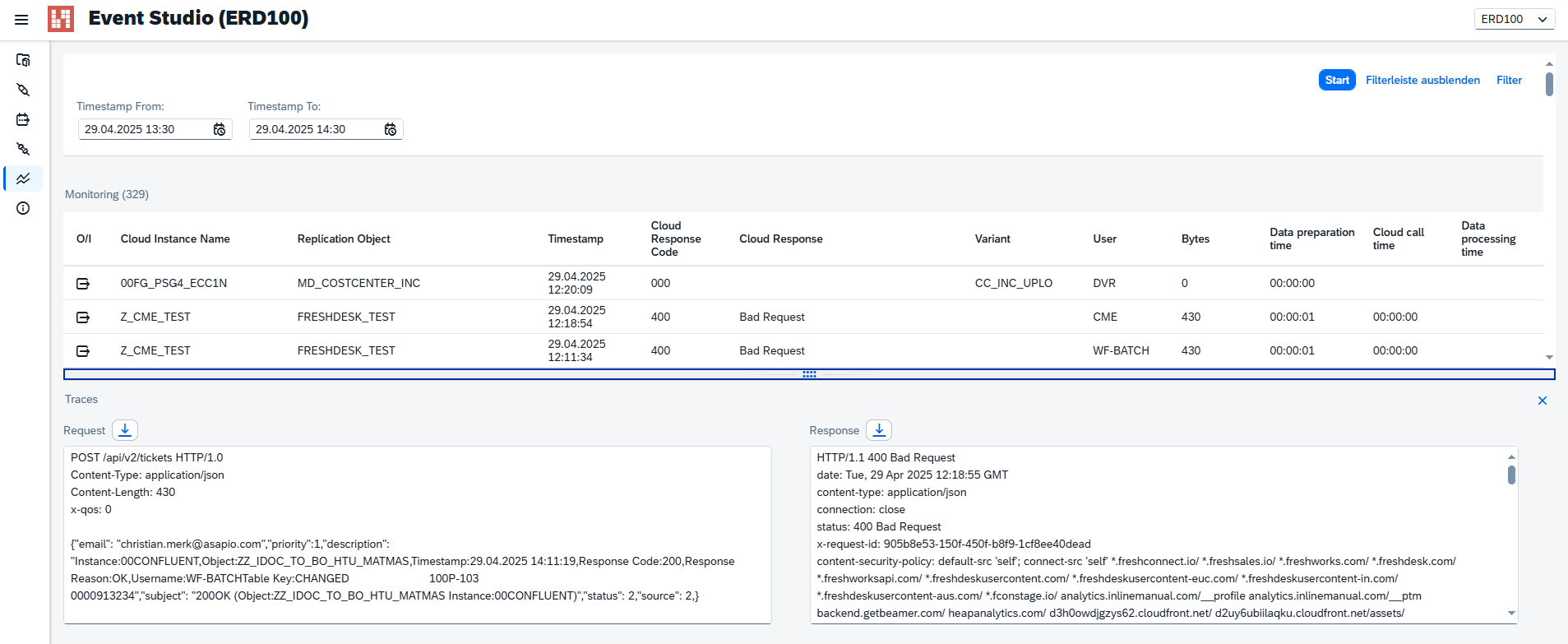
Visibility into every message, without leaving the browser
Event Studio's Monitoring page gives integration teams a direct view into the runtime activity of all configured interfaces. Filter by time range, drill into individual calls, inspect payloads and download trace files – all from the same UI used to deploy.
- Timestamp filter for high-volume landscapes
- Status codes and timing per call – identify failures immediately
- Expand rows to inspect full request and response payloads
- Download trace files for detailed root-cause analysis
- New filters by connection instance, object and status code – narrow down large result sets faster
One-click deployment to any destination
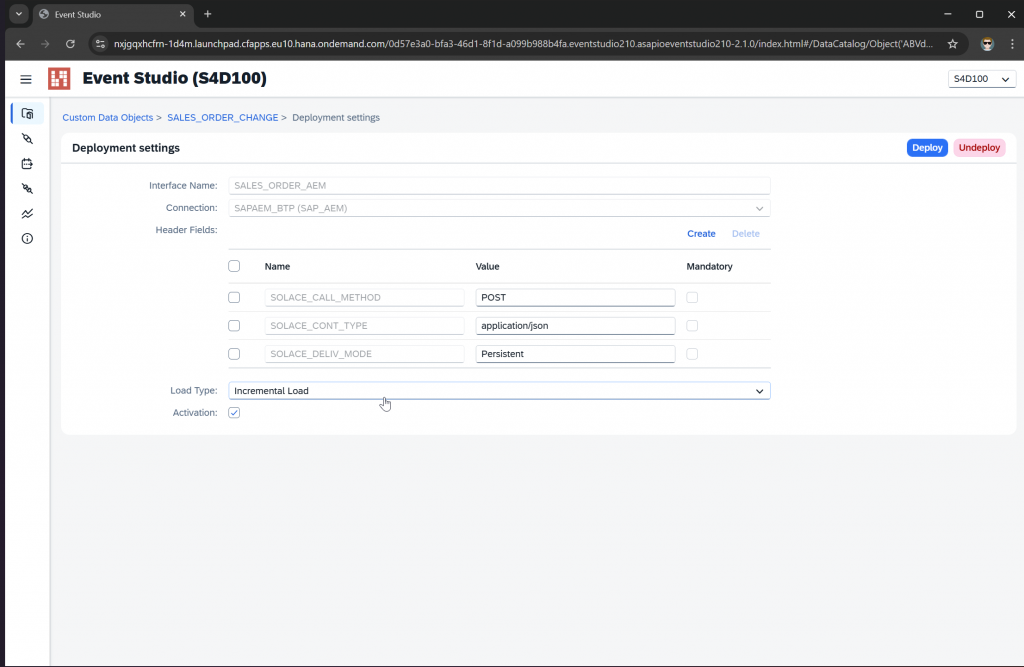
Deploying a new SAP integration usually takes days of configuration and custom code. With Event Studio, it takes seconds. Select your source event, choose your destination connector, and let Event Studio handle the back-end complexity.
- Guided workflow for outbound interface creation
- Auto-provisioning of required back-end settings
- Validate connections in real-time before going live
- Build the outbound topic from segments at deploy time instead of a fixed string (Solace / Advanced Event Mesh)
- Undeploy interfaces directly, right next to Deploy – no manual backend step needed
- Configure packed-load settings directly in Event Studio, without a separate backend step
- Map payload fields to correlation IDs, message IDs and custom user properties, and route same-document messages to the same partition (Solace / Advanced Event Mesh, HTTP connectivity)
Self-documenting integrations with AsyncAPI
Stop maintaining manual integration spreadsheets. Export your interface definitions directly as AsyncAPI schemas to feed your enterprise architect tooling, SAP Build, or Developer Portals.
- Instant schema generation for any configured interface
- Compatible with standard AsyncAPI tooling and explorers
- Keeps your technical documentation in sync with reality
How to create an interface with Event Studio
See how quickly a new SAP integration goes from catalog to live deployment – without writing a single line of code.
Works with all connectors
Event Studio manages interfaces for all connectors included in the ASAPIO Integration Add-on.
Available to ASAPIO Integration Add-on customers with a licensed event-driven integration connector.
Versions & compatibility
Event Studio version per ASAPIO release and edition.
| Release | ABAP Edition | BTP Edition | CAP Edition |
|---|---|---|---|
| 2510 | 2.0.0 | 2.0.0 | – |
| 2604 | 2.1.0 | 2.1.0 | – |
| 2607 | 2.2.0 | 2.2.0 | 2.2.0 |
| 2610 | 2.3.0 | 2.3.0 | 2.3.0 |
Release numbers follow the pattern YYMM, e.g. 2607 = July 2026. – = not available in this release.
See Event Studio in your SAP landscape
Included with the Integration Add-on – no additional licence needed. Book a session with our integration team to walk through a live setup in your system.